Release 6.18 - Schedule Multiple Service Times in One Step!

📅 New Feature: Schedule Multiple Service Times in One Step!
Planning multiple services on the same day just got a whole lot easier. With our new Multi-Time Scheduling update, you can now schedule a playlist once — and apply it to several time slots in a single click.
🙌 What’s New:
- ✅ Select one date, add multiple times
- ✅ Apply the same playlist across all time slots
- ✅ Easily see and manage your grouped times in the calendar or list view
⚡ Why it Matters:
- 🔁 No more repeating the same steps over and over
- 📉 Reduces mistakes from manual scheduling
- 🎯 Cleaner, faster workflow — especially for Churches running 3+ services a day
Example:
Schedule your Sunday playlist for 10:00am, 1:15pm, and 3:00pm — all at once.
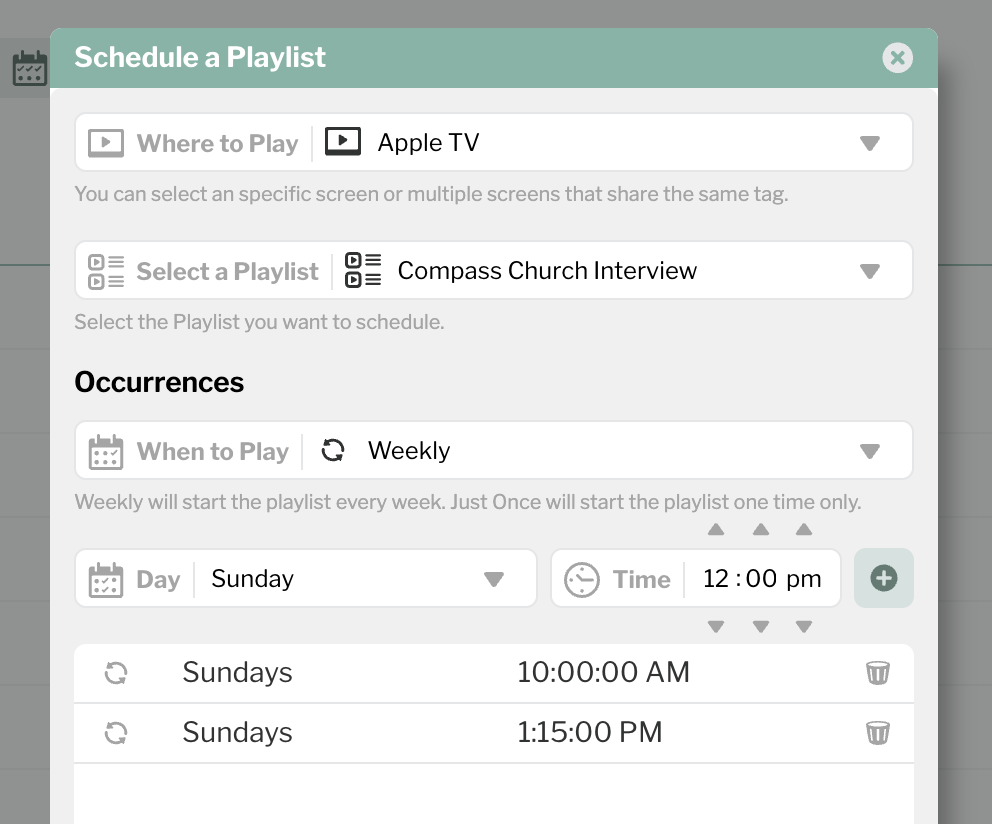
This update is designed to save you time and make Sunday planning smoother than ever. Head to the Scheduler to try it out!
1
Please sign in to leave a comment.
Comments
0 comments