Music Playlist (Management, Volume, Shuffle)
Completed
Music Playlists - I need to be able to tag a playlist of audio to play behind a slide. I know we can add a single song to a single slide, but we need to be able to have music playing during walk in or during a group time.
Music Volume - I need to be able to set the background volume music level. We have several classes that are video based but then also have group time with them. We need the ability to click out of the video to the next slide and have it play music. BUT be able to set that music to a lower volume.
Shuffle - For the sake of the concept the playlists would need to shuffle so that the same song doesn't play every time the slide is clicked.
-
Official comment

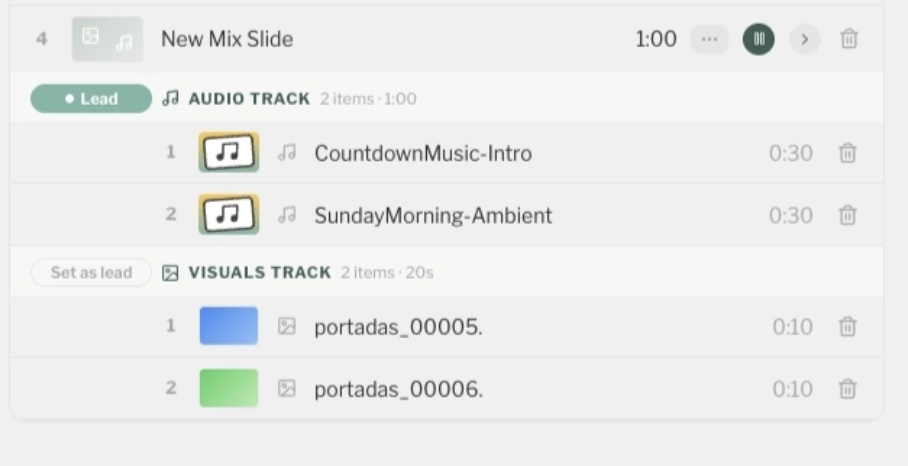
We are currently testing UI/UX ideas for this feature. Stay tuned + feedback is welcomed!
-

Hey Sam, I'm just another Playlister user like you, with a couple ideas that might help.
Music Playlists - We've created videos with the slide as the image and then 45 min of walk in / walk out music.
Music Volume - Could you duplicate and then "Trim" the videos within Playlister and then adjust the volume lower for the group time portion?
Shuffle - I also would appreciate the ability to Shuffle randomly between multiple songs or photos. Perhaps if the song was low enough in volume to not be distracting if it was used repetitively or maybe if the song was changed each group time or each of week of group content.0 -
Sam + Tyler, love the thoughtfulness here. We’ve seen a few creative workarounds (like Tyler’s!) that help get close to this flow today. That said, true support for background music, volume control & shuffling would require deeper changes to how Playlister handles audio under the hood. Not off the table. Just trickier to build / surface in a clean way. Appreciate you both putting this on our radar. If we explore a “group time mode” in the future these kinds of controls would make sense. Keep the ideas coming. We’re listening.
0 -
Super excited for this. My hope is that instead of just adding multiple songs to a slide we could add a playlist or folder of songs to be pulled from. That way we could add a single playlist when we want the music to play instead of having to drag in each song.
BUT what i see here is a start to something awesome.
P.S. Can't tell if there would be a shuffle feature in that current build out.
Would love to take it for a spin if the opportunity was there.0 -

Our use-case is also walk-in music behind a slide – honestly the only notable thing we gave up moving to Playlister.
Mix Slides look great! The name is clear as well.
The ability to shuffle would indeed be nice, even if only to prevent walking down the halls hearing every classroom that scheduled the same walk-in Mix Slide but it started at slightly different times. :) I suppose in this scenario it would need to be randomized on-device.
Even something as simple as this for the shuffle UI:

Only other feedback: It isn't intuitive to me what the “Lead” button does. Something to do with timing, perhaps? Or control?
I'm curious what center clicking the remote would do while on a Mix Slide. Intuitively I would guess it'd allow you to prev/next the song, or prev/next the slide, depending on who you are. Certainly some interesting UX considerations there.
Can't wait for this! Happy to test and provide feedback as well.
0 -
Hey Cameron- love the feedback! Especially the on device shuffle point that's a really good catch. I'm curious, how many songs are you typically loading into a walk-in music rotation?
0 -
Good question! It depends on method used.
When we used a ubiquitous streaming service, we had just one or two playlists with 20-30 songs that were shared to every classroom, and they would just hit shuffle and play. This method may be where some of the requests for a sort of ‘linked playlist’ come from. Easy to maintain, consistent across different classes and teachers.
At another time we used a computer with a popular presentation software in each classroom where music files were loaded into playlists. In that case it was 4 to 10 songs. More work to maintain and update each playlist, but it did work.
0 -
Ok crew! Update your screen app in the App Store to Playlister 8.0 - because this Music Mix idea/feature is part of the update.
We will release the feature inside the Playlist Manager once we see a majority of our customer on 8.0 :-)
COMING WITH 8.0!!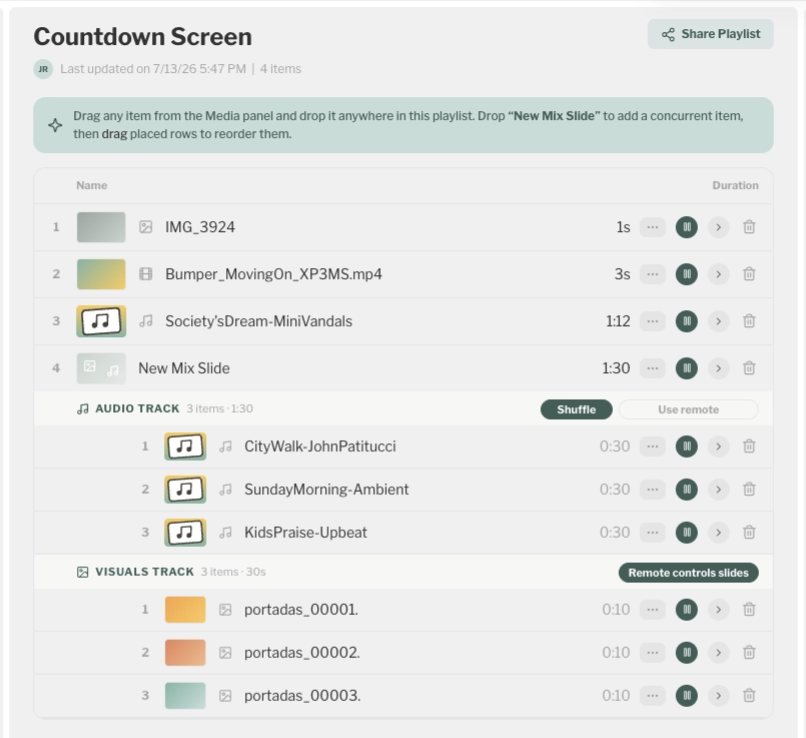 0
0
Please sign in to leave a comment.
Comments
8 comments