Playlister 8.0 for Apple TV is live

What you get today
A fix for audio sync. Some of you have reported audio drifting out of sync during playback. This release includes a fix for it.
Your Apple TV model number now shows up in Screen Details, so you can tell which device is which when you’re troubleshooting.
What unlocks soon
Music Mix and Transitions are both built into this release, turned off for now.
Music Mix lets you put music behind images and video on the same slide, so changing the song doesn’t mean rebuilding the whole video.
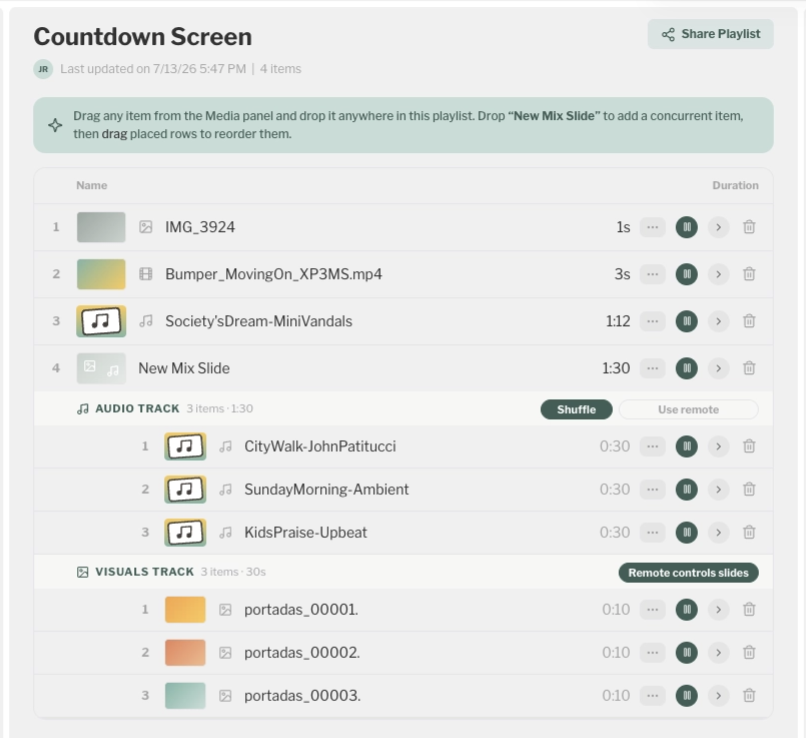
Transitions adds a soft fade between slides and videos instead of a hard cut.
We turn these on once enough screens are running 8.0. The sooner your screens update, the sooner we can switch them on for everybody.
How to update
Pro kits: we handle this for you. Nothing to do.
Lite screens: your Apple TV may update on its own, but it’s worth checking. Go to Settings, then Apps, and make sure Automatically Update Apps is on. To update right now, open the App Store on your Apple TV, find Playlister, and choose Update.
One ask
If you’ve had audio sync trouble and it’s still happening after you update, email support@playlister.app. We haven’t been able to reproduce it on our end, so hearing from you is the fastest way to close it out.
Please sign in to leave a comment.
Comments
0 comments